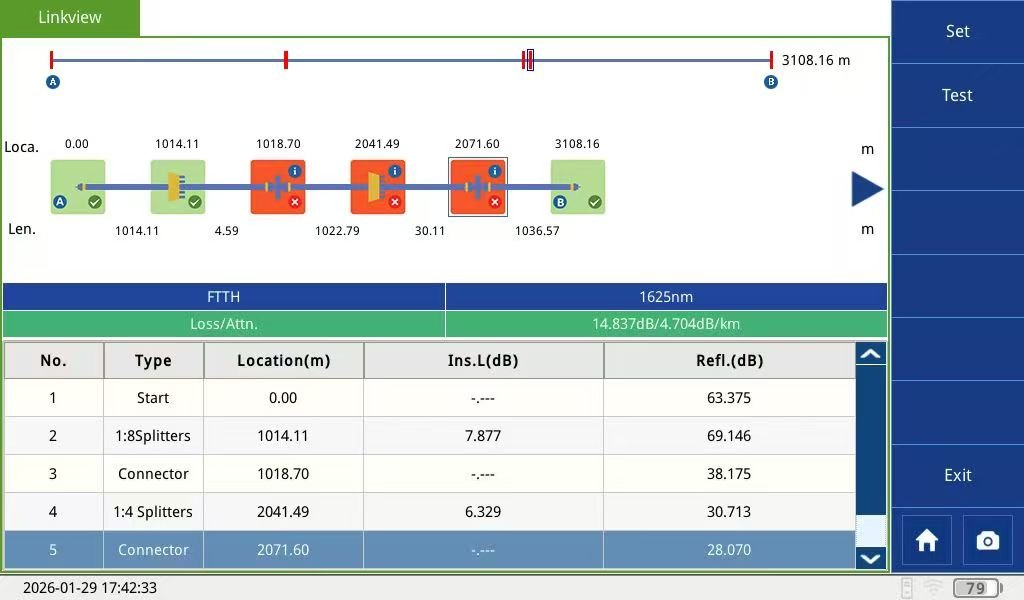
Summary: 1625nm Live Fiber Troubleshooting is the gold standard for maintaining active PON networks without disrupting customer services. By operating at the 1625nm out-of-band wavelength, it allows technicians to locate faults while the network is still running. This guide uses internal data from the G-Link TRP800 Series to explain how to optimize pulse widths and intelligent algorithms for complex FTTH environments.
1. Why Is 1625nm the Standard for Live Fiber Troubleshooting?
In a live Passive Optical Network (PON), upstream and downstream data occupy the 1310nm, 1490nm, and 1550nm bands. If a technician uses these wavelengths for testing, it will cause immediate service outages.
1625nm Live Fiber Troubleshooting works because this wavelength sits in the “U-band,” far from active communication signals. The G-Link TRP800 features an integrated filter that blocks 1490/1550nm signals, ensuring the instrument can safely analyze the fiber while users stay online.

2. The Core Challenge: Testing Through Multi-Stage Splitters
PON networks are not simple point-to-point links. Optical splitters (1:8, 1:32, etc.) introduce massive attenuation. Most standard OTDRs cannot “see” past the first splitter. To achieve successful 1625nm Live Fiber Troubleshooting, you need a device with a high dynamic range (up to 45dB) to penetrate these high-loss points and identify faults at the far end of the link.
3. Technical Insight: Why Pulse Width Matters (Internal Test Results)
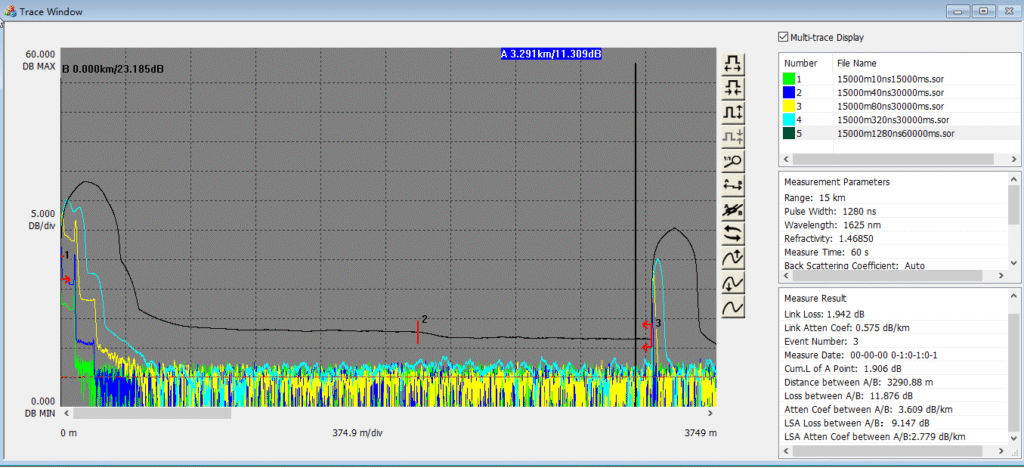
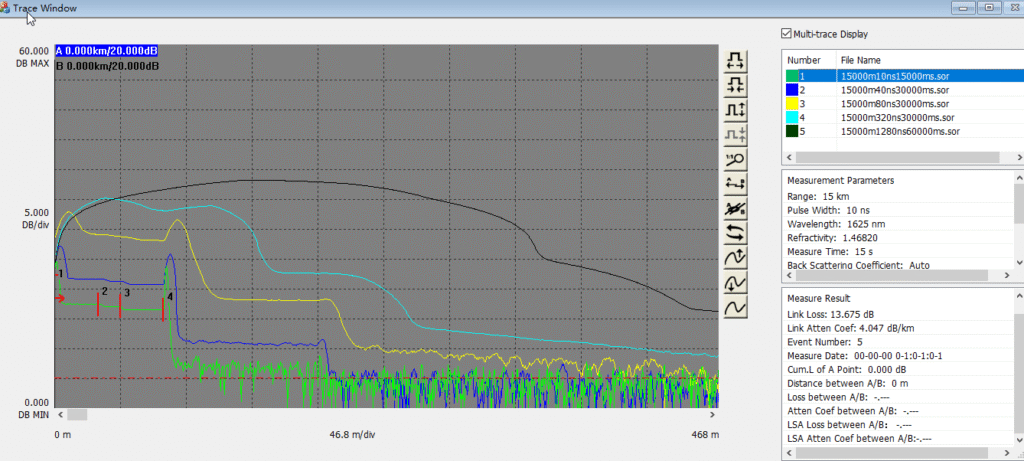
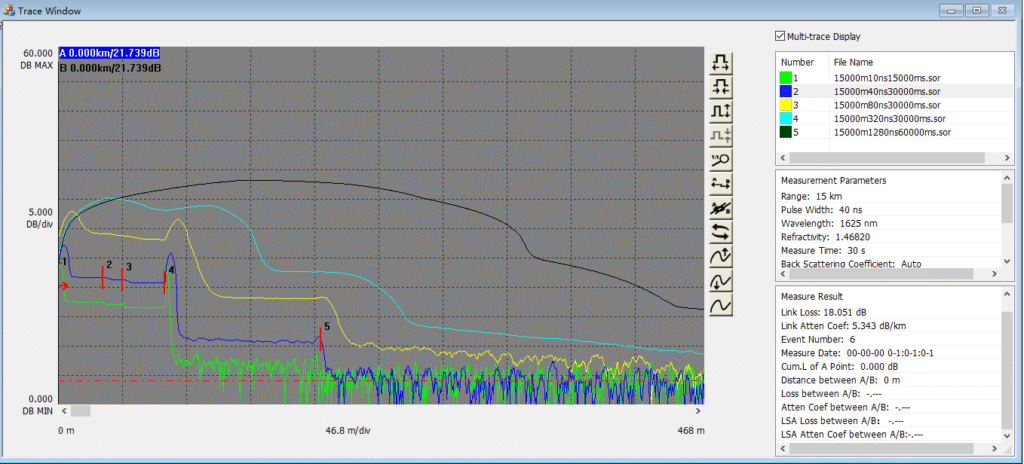
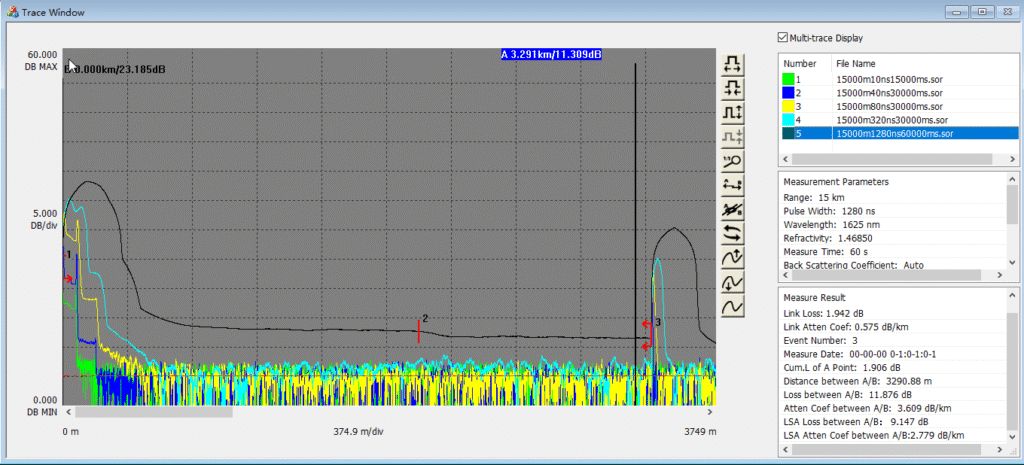
Based on G-Link’s internal testing report, no single pulse width can identify all events in a PON network. 1625nm Live Fiber Troubleshooting requires a multi-pulse approach:
- 10ns Pulse: Best for identifying near-end fusion splices (Events 2 & 3 in our report).
- 40ns Pulse: The ideal setting for identifying the location of 1:8 Splitters (Events 4 & 5).
- 1280ns Pulse: Essential for reaching the end of the fiber (B3 point) and penetrating second-stage splitters.
4. Step-by-Step Guide: How to Perform Live Testing with G-Link TRP800
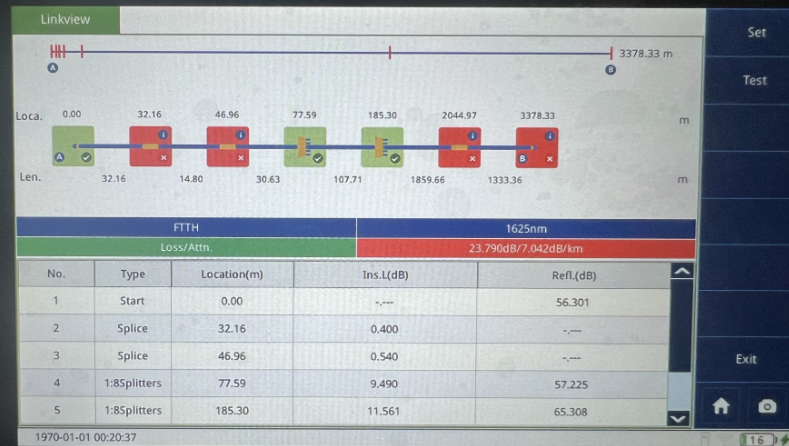
Using the TRP800 makes 1625nm Live Fiber Troubleshooting practical for field technicians through its intelligent “FTTH Mode.”
- Port Connection: Connect the active fiber to the dedicated 1625nm Filtered Port.
- Mode Selection: Tap the FTTH icon on the main menu.
- Automatic Analysis: The TRP800 automatically cycles through multiple pulse widths (10ns to 1280ns) and merges the data.
- Review the Link Map: View the results in an easy-to-read icon view rather than a complex trace.
5. Comparison: Standard OTDR vs. TRP800 PON Specialist
| Feature | Standard OTDR | G-Link TRP800 (1625nm) |
| Live Network Safety | High Risk of Service Interruption | Safe 1625nm Out-of-Band Testing |
| Splitter Penetration | Limited | Optimized for 1:64 / 1:128 Ratios |
| Data Interpretation | Manual Trace Analysis | Intelligent Link Map (iLM) |
6. Best Practices for Accurate 1625nm Live Fiber Troubleshooting
- Cleanliness is Key: Always use a specialized cleaner for the OTDR port and the fiber connector to avoid “ghost” reflections.
- Use a Launch Fiber: A 50m-100m launch cable helps the OTDR overcome the initial dead zone.
- Verify Macro-bends: Use the 1625nm wavelength to detect macro-bends, as they are more visible at longer wavelengths compared to 1310nm.
7. Frequently Asked Questions (FAQ)
Q: Will the test pulse interfere with my OLT? A: No. The 1625nm Live Fiber Troubleshooting signal is far from the OLT’s operating range, and the TRP800 manages power levels to ensure safety.
Q: Can I use this for backbone links? A: Yes, the TRP800 TR700 and TR600 series also support long-distance testing, but the TRP800 is specifically optimized for PON/FTTH environments.
Q: What is the maximum distance for live testing? A: With the TRP800’s 43/45dB dynamic range, you can reliably test live links up to 80km-100km, depending on the splitter ratios involved.
Effective 1625nm Live Fiber Troubleshooting reduces downtime and improves ISP maintenance efficiency. The G-Link TRP800 offers the professional precision needed for today’s complex fiber infrastructures.